Beyond Account Existence: Enriching OSINT Investigations with API Response Metadata
If you use OSINT Trace for security research, fraud checks, or account investigations, confirming that an email, username, or phone number is registered is usually just the starting point. Until recently, our API only returned a simple status object: {"live": boolean, "note": string}. We have now updated both the Workspace Playground and the REST API to return a metadata object whenever additional profile details are available.
In this post, we'll look at how the updated response format works, what fields each platform can return, why some searches still only return "live": true, and how you can turn metadata off in your Workspace Account Settings when you need strict GDPR compliance.
1. What Changed: From live and note to Profile Metadata
Previously, every platform check in OSINT Trace gave you a simple two-field response: {"live": boolean, "note": string}.
{
  "live": true,
  "note": ""
}
Knowing that an account exists is useful, but in real investigations it usually brings up immediate follow-up questions. Was this X account created ten years ago or ten minutes ago? Does this phone number belong to a regular WhatsApp user or a business storefront? Is a company email tied to a personal Microsoft login or an enterprise Azure AD directory?
Previous Response:
[Target Input] ---> [OSINT Trace] ---> { "live": true, "note": "" }

Current Response:
[Target Input] ---> [OSINT Trace] ---> { "live": true, "note": "", "metadata": { ... } }
No Breaking Changes to Your Existing Code
To add these details without breaking existing scripts or integrations, we kept live and note exactly as they were and added an optional metadata object alongside them. Any code checking response.live continues to work the same way.
Viewing Metadata in the Workspace Playground
Inside the OSINT Trace Workspace Playground, available metadata is displayed directly on each platform card. You can also click the { } JSON button on any card to inspect and copy the raw JSON payload:
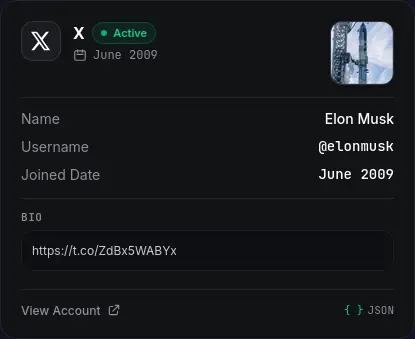
June 2009), display name, handle, avatar, bio, and profile link. 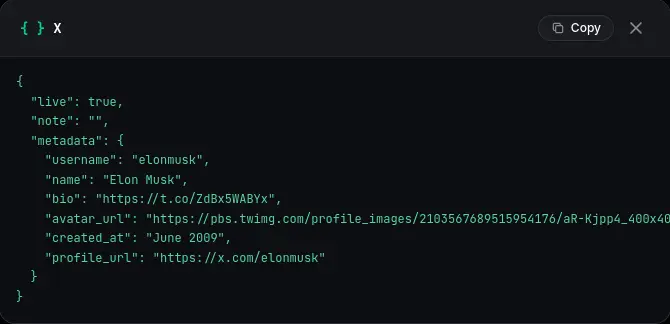
{ } JSON shows the full response with live, note, and the nested metadata object. 2. What Metadata You Can Get Across Platforms
Each online service exposes different public details. When those fields are available, OSINT Trace normalizes them into consistent keys across social networks, messaging apps, work directories, and shopping sites.
Social Networks (X, Snapchat, Instagram, Facebook)
- X (Twitter): Returns
username, displayname,bio,avatar_url, account creation date (created_at, such as"June 2009"),followersandfollowingcounts,is_verified,has_custom_avatar, andprofile_url. - Snapchat: Pulls public profile information including
username, displayname,bio, Bitmojiavatar_url,followerscount, verification status (is_verified),profile_url, and a directsnapcode_url. - Instagram: Returns the numeric
user_id,username,name,bio,avatar_url,followers,following,posts,is_private,is_verified,is_business, accountcategory, andexternal_url. - Facebook: Returns profile
name, numericuser_id,avatar_url,has_custom_avatar,profile_url, and anylinked_accountsconnected through Meta Accounts Center.
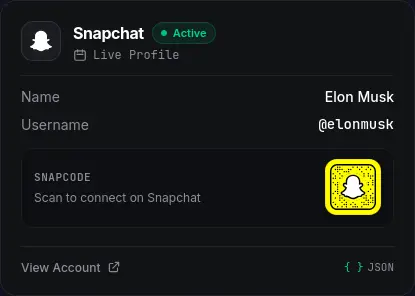
metadata.snapcode_url. Messaging, Work & Shopping (WhatsApp, Microsoft, Amazon)
- WhatsApp: Indicates whether a phone number belongs to a regular personal account or a Business profile (
is_business,account_type,is_verified), along with the public displayname,avatar_url, and storecatalog_url. - Microsoft & Azure AD: Shows whether an email is backed by a personal Microsoft account (MSA) or a company Azure AD tenant (
account_type,tenant_type), and includes the enterprise loginfederation_url, supportedauth_methods, and masked recovery hints (masked_email,masked_phone). - Amazon: Identifies Customer, Author, and Influencer profiles (
account_type,name,bio,avatar_url,profile_url) and includes masked recovery hints when available.
Platform Metadata Overview
| Platform | Metadata Fields | What It Helps You Check |
|---|---|---|
| X (Twitter) | username, name, bio, avatar_url, created_at, followers, following, is_verified, profile_url | Account age (created_at) and profile details |
| Snapchat | username, name, bio, avatar_url, snapcode_url, followers, is_verified, profile_url | Bitmoji avatar, follower count, and Snapcode link |
| user_id, username, name, bio, avatar_url, followers, following, posts, is_private, is_business, category | Permanent numeric user_id, business type, and follower count | |
| user_id, name, avatar_url, has_custom_avatar, profile_url, linked_accounts | Profile link and connected Meta Accounts Center profiles | |
| is_business, is_verified, account_type, name, avatar_url, catalog_url, profile_url | Business vs. personal phone check and store catalog link | |
| Microsoft | account_type, tenant_type, federation_url, auth_methods, masked_email, masked_phone | Company Azure AD vs. personal account check and SSO endpoints |
| Amazon | account_type, name, bio, avatar_url, masked_email, masked_phone, profile_url | Customer, Author, or Influencer profile details |
| live, note (Metadata coming soon) | Fast Gmail and Workspace check. Profile metadata is in active development and rolling out soon (we're on it!) |
More Platforms & Metadata on the Roadmap
We are actively expanding metadata extraction across our entire platform roster. We are currently working on returning profile metadata for Google (we're already on it!), alongside additional metadata attributes and new target networks planned in upcoming engine updates.
3. What to Expect: Why Metadata Isn't Returned on Every Search
We want to be upfront about how this works in practice: you won't get a metadata object on every single check. Depending on what you search, OSINT Trace may still return just {"live": true, "note": ""} (with metadata set to null or omitted), or return only a few fields.
Whether metadata comes back on a search depends on three practical factors:
- The platform itself: Not every website exposes public profile fields during an account check. For example, Google checks currently confirm whether an account exists via
liveandnotewithout returning profile metadata, but our team is actively on it and Google metadata support will be rolling out soon. On the other hand, platforms like X, Instagram, Snapchat, Facebook, WhatsApp, and Microsoft already expose rich details when available. - What you searched with (username vs. email vs. phone): The type of input you pass in determines how the platform is checked:
- Username searches (like
elonmuskon X, Snapchat, or Instagram) check public profiles directly, which usually returns the most data: display names, bios, join dates, follower counts, and avatars. - Email or phone searches usually check login or registration endpoints rather than a public profile page. On many platforms, an email or phone lookup can only confirm that the account is registered (
"live": true) or return partial recovery hints (such asmasked_phoneormasked_emailon Microsoft and Amazon) instead of a full profile card.
- Username searches (like
- The account's privacy settings: Even when a platform supports metadata, the user's own privacy settings play a big role. If someone locks their social profile, hides their WhatsApp profile photo from non-contacts, or restricts their company Azure tenant, only basic existence or partial fields will be visible.
Tip for developers: When parsing OSINT Trace API responses in your code, always treat
metadataas optional (for example,result.get("metadata") or {}). Uselive: trueto check if the account exists, and treatmetadataas extra context when present.
4. Using Metadata in the API and Bulk Scans
Response metadata works out of the box across single-platform checks (POST /v1/check/{program}), multi-platform checks (POST /v1/check), and async bulk jobs (POST /v1/check_bulk_async) on OSINT Trace.
Example: Fetching Metadata with Python
Pass your X-OSINT-Key header to /v1/check and read the metadata dictionary from each active platform:
import requests

url = "https://api.osinttrace.com/v1/check"
headers = {
    "X-OSINT-Key": "YOUR_API_KEY",
    "Content-Type": "application/json"
}
payload = {
    "input": "elonmusk",
    "programs": ["x", "snapchat", "instagram"]
}

response = requests.post(url, json=payload, headers=headers, timeout=35)
data = response.json()

for platform, result in data.items():
    if result and result.get("live"):
        meta = result.get("metadata") or {}
        print(
            f"[+] {platform.upper()}: Live | "
            f"Name: {meta.get('name', 'N/A')} | "
            f"Created: {meta.get('created_at', 'N/A')} | "
            f"URL: {meta.get('profile_url', 'N/A')}"
        )
Bulk Scans & CSV Downloads
When you run a batch scan in the Workspace (up to 10,000 targets per job) or through POST /v1/check_bulk_async, any returned metadata is saved with the job results and included in the downloadable CSV export.
5. Turning Off Metadata for GDPR & Privacy Compliance
If your team works under strict GDPR, POPIA, or client Data Processing Agreements (DPAs), you may only be allowed to verify whether an account is registered without collecting extra personal data like names, profile pictures, or bios.
You don't have to change your API requests to do this. You can manage it directly in your Workspace Account Settings under Privacy & Compliance Preferences:
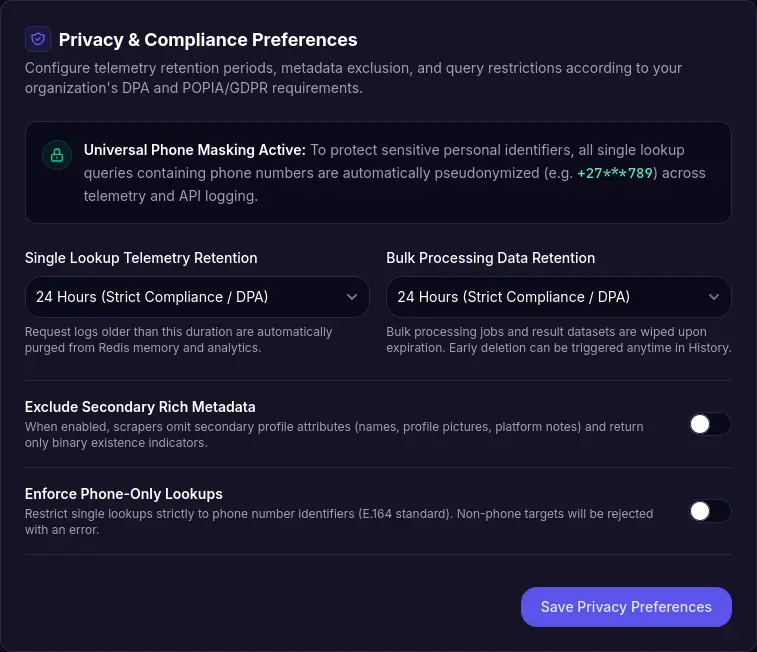
What You Can Control in Account Settings
- Exclude Secondary Rich Metadata: When enabled, OSINT Trace strips out extra profile fields (names, avatars, bios, and notes) and returns only binary existence results (
{"live": boolean}) across both the Workspace UI and your API keys. - Custom Data Retention (24 Hours, 7 Days, or 30 Days): Choose how long single lookup logs and bulk job results are stored. You can set retention to 24 Hours for strict DPA compliance, and delete any bulk job early with one click from your History page.
- Enforce Phone-Only Lookups & Phone Masking: Lock your account to E.164 phone number checks if required by your compliance rules. All single phone lookups are also automatically masked (for example,
+27***789) in logs and history.
6. Frequently Asked Questions
Does metadata cost extra API credits?
No. Metadata is collected during the same check at no extra credit cost. A lookup only uses credits when a valid 2xx response is returned.
Will this break my existing API integration?
No. The response keeps the exact same live and note fields as before, and simply adds metadata as an optional key. If you want the old binary-only response everywhere, turn on Exclude Secondary Rich Metadata in your Workspace Account Settings.
Why did a check return "live": true with no metadata?
As covered in Section 3, it depends on the platform, whether you searched by username, email, or phone number, and the account's privacy settings. When a service confirms an account is registered without exposing public profile fields for that input, OSINT Trace returns "live": true without guessing or filling in fake data.
Will more platforms and metadata fields be supported in the future?
Yes. We are actively expanding metadata extraction across our existing checkers and adding new target networks. For Google specifically, our team is already on it to return profile metadata very soon.
Try It Out
You can test metadata responses right now by running a search in the OSINT Trace Workspace, checking the endpoint docs on our Developer API Page, or comparing plans on our Pricing Page. If you have questions about compliance settings or API integration, feel free to reach out through our Contact Page.